
An automation ran. Something happened, a record updated, an email sent, a value changed. You weren’t there, and nobody asked your permission first. The only way to know what actually took place is the log. Reading one doesn’t require technical skill. It requires knowing what a log is supposed to tell you, and noticing when it doesn’t. Both of those are on this page.
What a log entry actually is
Strip away the technical framing and a log entry is a sentence: at this time, this happened, because of this, and here’s what it produced. A system that can’t produce that sentence for something it did is not accountable for what it did. There’s no record for you to check. Only a claim that it behaved.
Four years running platform support at Pantheon put me on the other end of those emergency calls, and most of them came down to one question: what actually happened, and in what order? Sites with a clear record of who changed what, and when, got diagnosed and fixed within the hour. Sites where nobody could reconstruct the sequence took the rest of the day before anyone could even agree on the cause. That pattern took four years to see clearly and takes one paragraph to hand over, so you never have to learn it during your own bad afternoon. The log was never a formality. It was the difference between a fix and a guess.
The five things every entry should tell you
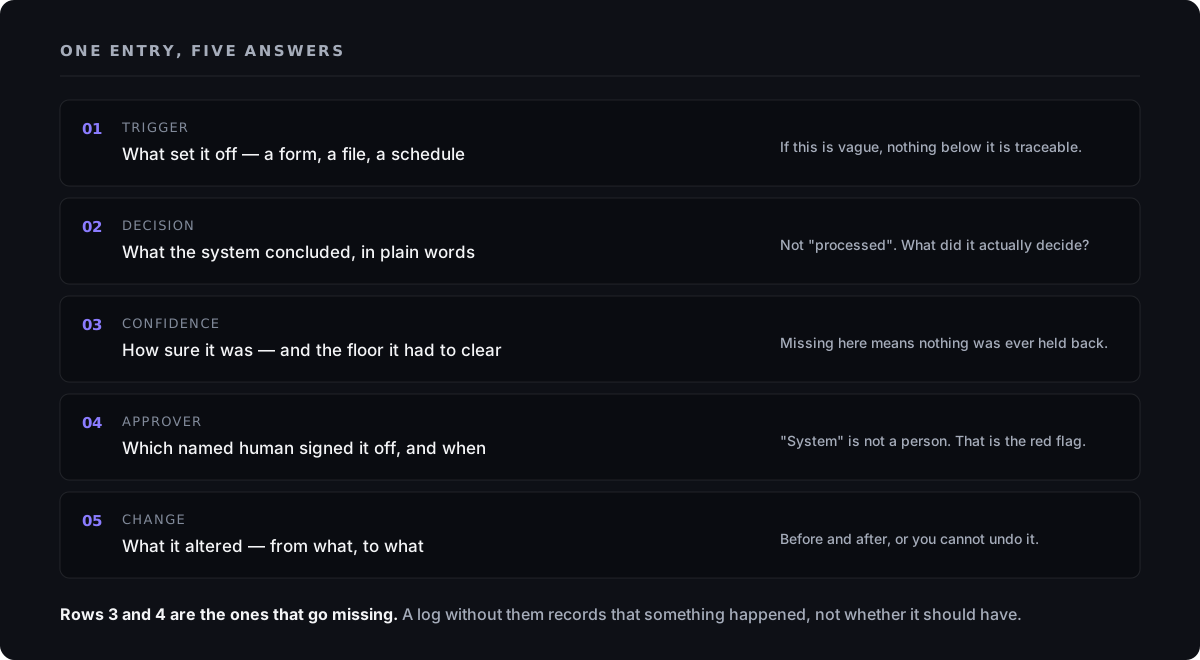
A log entry that’s doing its job answers five questions, every time, for every action. Miss one, and you’re not looking at an audit trail. You’re looking at a partial record with a gap exactly where the risk lives.
- What triggered it. The specific event that started the automation, a form submitted, a payment received, a document uploaded. Not “the system ran,” but the actual thing that set it off, with a timestamp.
- What the system decided. The output, in a form you can actually read. Not internal jargon, a plain statement of the result, such as “classified as a billing question” or “total and due date extracted as written on the document.”
- Its confidence. How sure the system was about that specific decision, as a number or a plain label. A system that won’t say how confident it was in a given case is asking you to trust every decision equally, which isn’t something even the system believes.
- Who approved it. If a human was supposed to review the action first, the log names that person and records what they decided, approve, reject, or edit. If nobody’s named, nobody reviewed it. Whatever anyone tells you afterward.
- What changed. The concrete result: the record written, the email sent, the field updated, with enough detail that you could check it against the live system and confirm it matches.
This is the same discipline behind our safe AI automation checklist, that guide is about building a system that produces logs like this. This one is about reading what you’ve already been handed, so you can name what is missing instead of only sensing that something is.
What a log that hides more than it reveals looks like
Some logs are technically logs and functionally useless. The pattern is consistent enough that you can spot it without any technical background.
- Entries that summarize instead of record: a tally of how many items were processed tells you a count, not what happened to any single one of them.
- No timestamps, or timestamps with no time zone given. You can’t reconstruct a sequence of events from a log that won’t say what order things happened in.
- A confidence score that’s always the same number, or missing for exactly the cases the system was actually unsure about.
- “Reviewed by system” where a person’s name should be. A system can’t review itself and call that independent approval, the same self-approval problem covered in what a passing test actually proves.
- Gaps during exactly the hours or days something went wrong, a log that’s thorough on ordinary days and thin during the incident is a record of everything except the part you needed.
- No stated retention period, or one nobody can confirm. A log that disappears quickly can’t be checked once a problem takes longer than that to surface, and you don’t get to schedule a dispute.
A log that summarizes instead of records is not evidence. It is a claim wearing evidence’s clothes.
The three questions to ask when a log looks wrong
You don’t need to diagnose the system yourself. That is the job of whoever built it, and you are entitled to hold them to it. Ask three questions, and listen for whether the answer is specific.
What was the input, exactly? Not a summary, the actual thing the system received. If the answer is vague, the log isn’t tracing back far enough to be useful to you.
Why did the confidence score not trigger a hold? If something went wrong and the system’s confidence was low at the time, ask why that didn’t stop the action from happening automatically. A well-designed system holds low-confidence actions for a human. If yours didn’t, that threshold is missing, or set too loosely.
Who signed off, and can I see their decision separately from the system’s own output? You want a human decision recorded as its own distinct entry, not folded into the system’s output as if the two were the same thing. If the answer blurs them together, there was likely no independent review at all.
Seeing the pattern, not a promise
The same standard is going into Ranex, my own governance kernel for AI-assisted work, pre-release, and not something I’m asking you to adopt here. It earns a mention for one reason: it shows what this standard looks like when someone builds to it deliberately, which gives you something concrete to point at. Every verdict it produces gets written to an append-only, hash-chained journal, a record built so it can’t be quietly edited after the fact once it exists. The tool isn’t the point. The point is that a log worth trusting has to be built to resist being rewritten, not only built to exist, and that is a fair thing for you to ask of whoever built yours.
Anito’s demo lab runs three sandboxed automation patterns built to show this exact structure, trigger, process, human review, output, with every step logged in a plain run record you can read without technical background. It’s a demonstration, not a client result: there’s no finished engagement behind it. It exists so you can see the shape a trustworthy log should have, and know what to ask for, and what to send back, when a system is built by someone else.
If you already have an automation running, and want an independent read on whether its logs hold up to these questions, the diagnosis is free. A straight answer in writing, whether or not anything follows it.
Common questions
Does a small business actually need audit logs, or is that only for regulated industries?
Regulation is what forces the question. It is not what creates the need. The moment something runs without a person watching it, an automation sending email, updating records, moving money, a log is the only way you find out what it did on a day you were not looking. Without one, a customer dispute comes down to your memory against theirs, and memory is not evidence. Regulated businesses were made to build this early; everyone else gets to choose, and the cheapest moment to choose is before the system is built rather than during the afternoon you needed it.
How long should we keep audit logs?
Long enough to outlive the slowest route a problem takes to reach you, and that is a number you already know and your developer does not. Work it out with your own figures: how long can a customer dispute a charge, how far back can a tax authority ask you to go, how long does one of your contracts stay open to challenge? Take the longest of those and keep the logs past it, because a log that expired the month before the dispute arrived is the same as no log at all. Then get the retention period written down and confirmed, since “we keep them for a while” describes a setting nobody has opened.
Who should be able to edit or delete audit log entries?
Nobody who can perform the actions being recorded. If one account can change a record and then remove the line saying it changed the record, the log has stopped being independent evidence and become a note that happened to survive. Ask two things: who holds permission to delete or edit entries, and whether deleting one leaves a trace of its own. The answer you want is that entries are added and never altered, delivered as a flat no with a reason behind it, not as “why would anyone do that?”
The automation has no log at all. What do I ask for?
Ask what it would cost to add one, and ask for it inside the next piece of work rather than as a project of its own, recording what a system did is a smaller job than building the thing that does it. Hand over the five items listed above as the written requirement, because “add logging” gets built as whatever is quickest, and quickest is a line that says the automation ran. Ask where the log will live and who can read it without going through the developer, since a record you cannot reach on a bad afternoon is not yours in any way that helps you. And if the answer is that the system cannot record what it did, you have learned something about the system rather than about the log.