
Every inherited or aging website eventually asks this question. And almost everyone answering it has a reason to prefer one outcome. The developer quoting the rebuild profits if you rebuild. The developer who has patched your site for years profits if you keep patching it. You’re usually the only person with no stake in which answer is true, which makes you the right person to decide it, once you have a way to check the answer yourself.
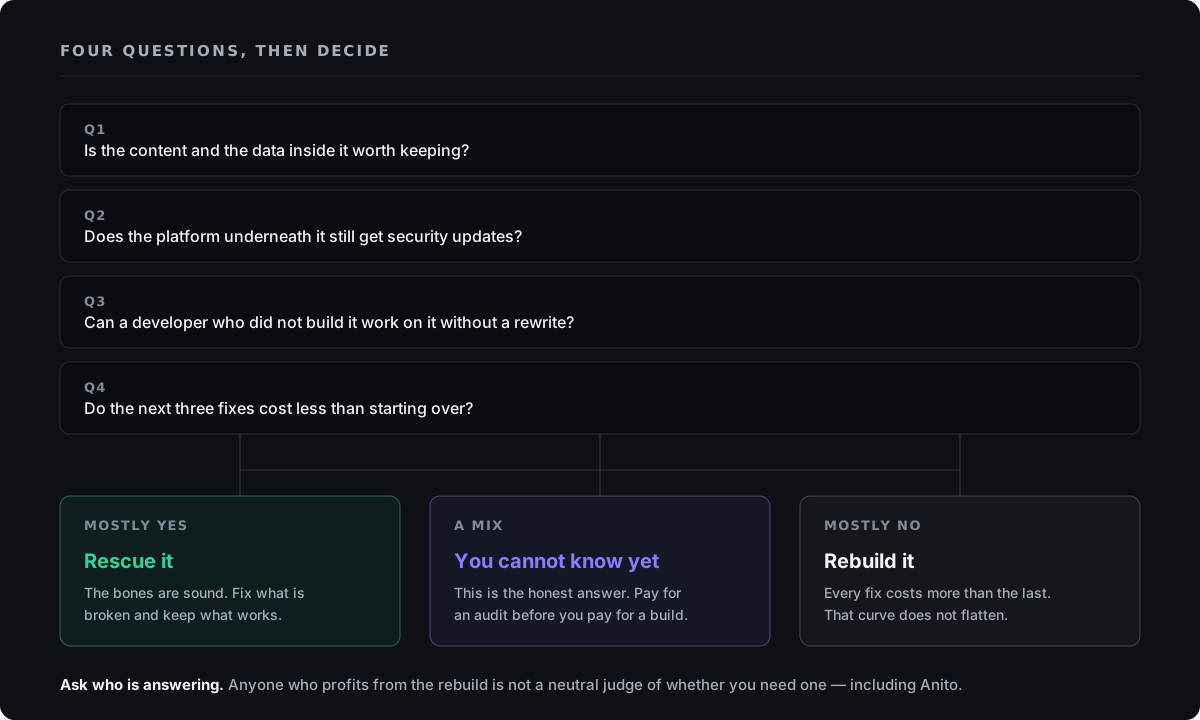
This is not a quiz with a score at the end. It’s a genuine decision tree: some conditions point one way, some the other, and some honestly can’t be answered without someone opening the code and looking, including the one nobody selling a rebuild wants to admit is possible. The sorting below is the part you can hand off. The call stays yours.
Signs that point to rescue
Read these against your own situation and count how many land. They tend to mean the existing system is worth keeping and repairing.
- The problem is specific and nameable, a broken checkout, an expired credential, one plugin conflicting with another, rather than “everything feels wrong.”
- You have access to the code and its version history, even if messy. A traceable history means the system can actually be understood and fixed.
- The underlying platform still fits the business, you’re not forcing one that has outgrown its tools to keep living on them. The problem sits on top of the platform, not underneath it.
- Staff and customers already know how to use the site, and the workflows work. The problem is technical, not a mismatch between system and business.
- The list of known issues is short enough to fit on one page.
Signs that point to rebuild
These tend to mean patching the system is spending money to delay a cost that’s coming regardless.
- Nobody can explain why the system was built the way it was, documentation is missing, and the version history is gone. You’d be maintaining a black box, not a known system with a bug in it.
- The technology underneath is no longer maintained, no security patches, no active support, a framework nobody building new software chooses anymore. Patching a dead foundation buys months, not years.
- The list of known problems keeps growing faster than anyone is fixing them, a system in active decay, not one with a fixed, containable list.
- The business has outgrown what the platform was ever built to do. That is a sign of growth, not of a bad decision back then. You wouldn’t be fixing a broken version of the right system. You’d be maintaining a working version of the wrong one.
- Every previous “fix” has been a patch on a patch, each one sensible with the information available at the time, and the accumulated complexity is now the actual problem, separate from the original bug.
Where the honest answer is “you cannot know yet”
This is the category most decision guides skip, because “get an audit” is less satisfying than a confident yes or no. It’s also, often, the correct one.
- You do not have access to the code, the hosting, or a clear picture of what’s running. Nobody can judge whether something is repairable without seeing it.
- The site mostly works but fails in ways nobody can explain. Intermittent, unexplained failures are exactly where a guess is expensive and a proper look is comparatively cheap.
- Different developers have told you different things, one says patch it, one says start over, and neither has shown their reasoning in a way you could check.
- Nobody has assessed whether the site is currently secure, and the honest answer is “no one has checked.” Not a real answer either way.
- Every cost comparison you’ve seen came from a single source with an obvious reason to prefer one outcome.
If two or more of these are true, the step that protects you is a technical audit before either decision, not because an audit is always necessary, but because guessing here tends to be the expensive path, not the cautious one.
The conflict of interest nobody says out loud
A developer paid to rebuild your site has a financial interest in the rebuild being right. That doesn’t make the recommendation wrong, rebuilding is sometimes the right answer, and a developer with integrity will say so even though patching would cost you and them less. But the incentive is real, and pretending otherwise helps only the person holding it. The same conflict runs the other way: a developer paid hourly to keep patching has every reason to keep recommending another patch.
This applies to Anito exactly as much as anyone else quoting you a rebuild. Any developer with a rebuild to sell, including this one, has a reason to prefer the more expensive answer. I can say all the right things about it. That doesn’t make the conflict disappear, and you shouldn’t let me saying it stand in for checking. What protects you is separating the diagnosis from the person who profits from the recommendation: ask what’s specifically wrong before you ask what it costs to fix. Get the findings in writing before you get a number. If the findings and the quote arrive together, from the same person, with no room to think between them, that’s worth noticing before you sign anything.
The part that stays invisible from the outside
I spent two years doing senior WooCommerce work at WooAssist, more often than not, rescue work. Stores built by someone else, handed over because checkout had stopped working, or the person who understood the customizations was long gone. Some were a fast fix: one expired payment credential, one plugin update that had quietly broken something else. Others had been patched by enough people, in enough different ways, that patching it again would cost more and leave something more fragile than starting clean. The part of that worth handing you is this: from the outside, both looked identical, a store with a checkout problem. So if you can’t tell which one you have, that is not a gap in your judgment. The difference only became visible once someone opened the code and looked.
A recommendation you cannot check is not worth much more than the guess it replaced.
Anito’s own rescue process follows that lesson: the audit and its findings come before any quote, in writing, so you can take them elsewhere for a second opinion if you want one. That describes the process, not a result, there’s no finished client engagement yet to point to as proof it worked. For the math on what a struggling site is costing you while you decide, see is your website costing you sales. For what a rescue engagement covers, start at website rescue and repair.
If you’re somewhere in the “cannot know yet” column above, the diagnosis is free, you get findings in writing before anyone asks you to choose between rescue and rebuild.
Common questions
Is paying for a technical audit worth it, or is it a way to charge me before the real work starts?
That is a fair suspicion and you should keep it, including about anyone who recommends an audit and then quotes the build, which is this guide’s own position. Here is how to tell the difference without trusting anyone: an audit is real when the findings land in your hands as a document, written plainly enough that you can take it to a different developer and get a competing quote off it. Then set the price against the decision it protects. Put the audit fee next to the cheaper of your two options and see what fraction of it you are being asked to spend. If it is a small slice of a number you would otherwise be guessing at, it is the cheap part of the month, and if the findings cannot leave the room, you were not buying an audit.
How do I get a second opinion without damaging the relationship with my current developer?
Tell them you are doing it, and give the reason in one sentence: the decision is big enough that you want a written picture of the system from someone with nothing to sell on either side. You are not auditing their work, you are buying a description of what you own, which is a reasonable thing to hold no matter who built it. A developer who is confident in what they built tends to be relaxed about this, and some will hand over the access before you finish asking. If the reaction is that a second look is unnecessary or insulting, that is information you did not have this morning, and you can file it without acting on it today.
If we rebuild, do we lose our content and our Google rankings?
Content moves. What damages rankings is page addresses changing while nothing connects the old ones to the new ones, and that job has a name and a public standard, Google Search Central publishes a site-move guide covering URL changes, so you can read what good looks like before anyone quotes you against it. Ask for the redirect map, the list pairing every existing page address with where it lands after launch, as a named deliverable with a date on it, agreed before the build starts rather than in the week of launch. Then ask which pages are being dropped on purpose, because a rebuild that quietly removes pages is a different decision from one that moves them, and that decision is yours rather than theirs.
Our site still works but it is several years old. Is age on its own a reason to act?
No. A site doing its job on software that still receives security updates can stay where it is for a long time, and replacing it because the number of years feels large is spending money on a feeling. The trigger is support, not age: find out which version of the underlying platform you are running, then check it against the maker’s own list of supported versions, which the mainstream platforms publish openly. If your version has fallen off that list, the clock is real and it has nothing to do with how the site looks. If it is still on the list and the site does what the business needs, the honest answer is that you have nothing to do this quarter, and anyone saying otherwise should have to name what is specifically failing.