
Why this is a checklist and not a conversation
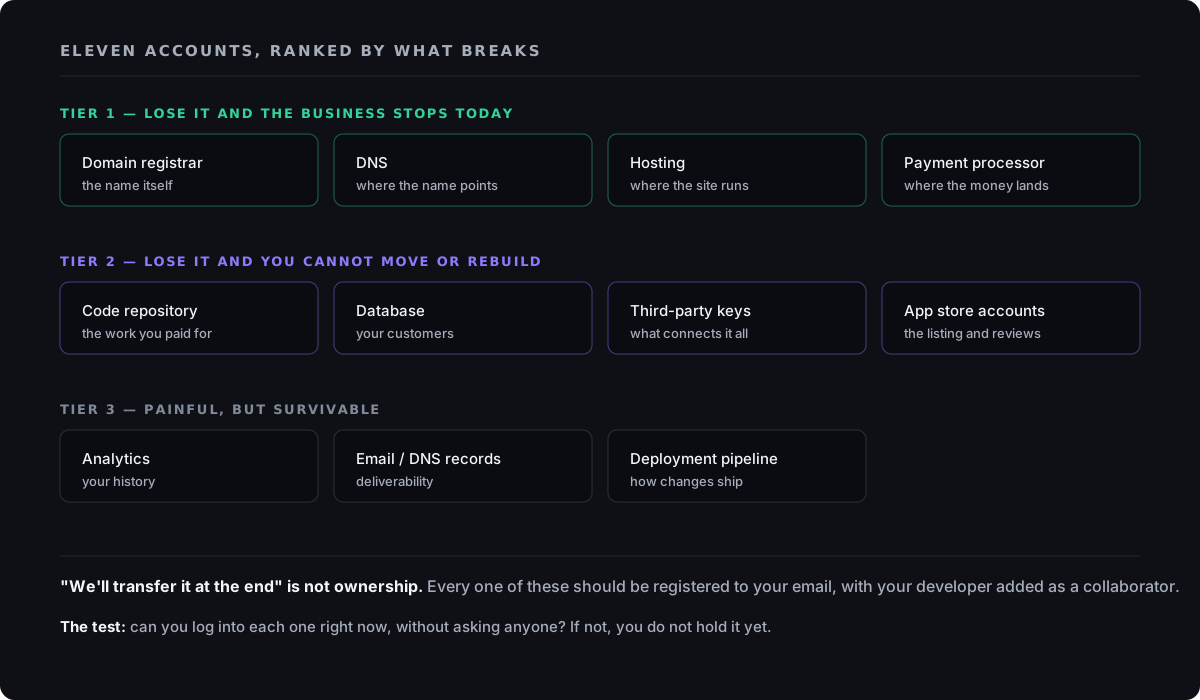
Asking a developer "do we own everything?" gets you a yes almost every time, and the yes is usually sincere. The gap isn't honesty. It's that "you own it" and "you can log in right now, without asking anyone, and prove it" are two different facts. Nothing in the normal course of a project ever prompts anyone to test the second one. Here's the full inventory to verify, one account at a time, before money changes hands, so the difference between those two facts never turns into a crisis. If it already has, the guide for that situation is When Your Developer Disappears. This guide exists so you never need that one.
I spent four years on platform support at Pantheon, and years before that on service desks, taking the call that starts this problem, so you can settle it in an hour instead. The request I heard more often than any other was never "how do I use this feature." It was "the person who set this up is gone, and nobody here can get in." The account existed. The business had been paying for it. Nobody could log into it without a support ticket, a legal request, or a long wait. Sometimes the developer left on good terms and forgot to hand off a login. Sometimes the business had never been told which accounts existed in the first place. Either way, the fix took days a live business doesn't have to spare. Every item below is on this list because I watched a version of that exact problem happen to a real account.
The five accounts that keep your business online
These five are the technical foundation. Lose control of any one of them and the site itself is at risk, not one feature of it. Check each the same way, and you need nobody's help to do it: log in yourself, today, with credentials only you hold.
- Domain registrar, the account controlling your business's name on the internet (GoDaddy, Namecheap, Cloudflare, or similar). Whoever holds it can point your domain anywhere, including at nothing. Verify by logging in yourself, right now, and checking that the registrant and admin contact show your business, not a developer's.
- DNS, the directory that translates your domain into the actual location of your website, email, and subdomains. It's often managed through a hosting account rather than the registrar, so owning your domain doesn't automatically mean you control DNS. Verify by asking which account holds your DNS records, and confirming you can log in and edit them yourself.
- Hosting, the server or platform where your website or application files actually run (WP Engine, Kinsta, AWS, DigitalOcean, or similar). If this account was set up under a developer's login, your site works today only because they still have access. Verify by getting an owner-level login of your own, not one the developer created, and can revoke.
- Code repository, where the source code lives, usually GitHub, GitLab, or Bitbucket, along with its entire history of changes. A final copy of the code without the repository is a snapshot with no history, far harder for a new developer to pick up. Verify that the repository sits inside an organization account your business owns, with the developer added as a collaborator. Not the other way around.
- Database, the store of your actual business data, separate from the code that reads and writes to it. Code can be rebuilt from scratch if it has to be. Years of customer data usually cannot. Verify that you know where it's hosted, that you hold credentials to reach it directly, and that backups run somewhere you can access without the developer's involvement.
The six accounts that keep your business running, paid, and reachable
These six don't run the site itself. But losing them stops money, communication, or your mobile app cold. They get overlooked more often than the technical five, because each one reads like "another login" on the day it gets created, and the day it matters is a different day entirely.
- CI/CD and deployment access, the automated process that takes finished code and puts it live. Without it, you can own every other item on this list and still be unable to ship a one-line fix without the original developer. Ask directly: if you hired someone else tomorrow, could they deploy a change without touching the previous developer's personal accounts?
- Third-party API keys, the credentials connecting your software to outside services: payment processing, maps, messaging, email delivery, AI providers. A key created under a developer's personal account can be switched off by someone who no longer works for you. Verify by listing every connected service and confirming each is registered to a business email and billing account you hold.
- Payment processor, the account (Stripe, Square, PayPal, or similar) that money actually moves through before it reaches your bank. Payout ownership, dispute handling, and tax reporting all attach to whoever the account belongs to. Verify that you personally hold the login, and that payouts route to your business bank account, not an intermediary's.
- Analytics, your historical record of traffic and customer behavior. Lose the account and you lose the ability to compare tomorrow against a year ago, not only going forward. Verify you hold admin access under a business account, not a personal one belonging to whoever set it up.
- App store accounts, Apple Developer and Google Play Console, if you have a mobile app. These are their own category of risk: Apple in particular ties an account to a specific legal entity or individual, and moving an app to a new account after the fact is slow, not a quick handoff. Verify the account is registered to your business as the legal entity, not an individual developer.
- Email and DNS authentication records, SPF, DKIM, and MX records that control whether your business email is delivered and trusted. Lose control of these and you can lose the ability to even receive the password-reset emails for everything else on this list. Verify you can see and edit these records yourself. Today.
The two items that are hardest to undo once they go wrong
Two items on this list deserve extra weight, because recovering them after the fact is slow, even when you're clearly in the right. A domain registrar dispute gets resolved through the registrar's own recovery process, which typically requires proof of business ownership and can take weeks, not days. An app store account is worse: Apple's developer program is tied to a legal entity, and transferring an app between accounts after launch is a documented but genuinely slow process, sometimes stretching over months, during which you may not be able to ship updates at all. Both are avoidable entirely by registering them correctly on day one. Neither is quick to fix once they're wrong.
A different pattern shows up with CI/CD and the database, not harder to fix, exactly, but easier to forget entirely. Both run quietly in the background for months or years without anyone touching their settings. There's no prompt to check who holds admin access until the day someone urgently needs to change something. By then, the person who set it up may be the only one who remembers it exists at all. The fix isn't complicated, and it's yours: add these two to the same one-hour check you'd run on anything else, on a schedule, not only when something breaks.
The one-question ownership test
For every account on this list, one question settles it: could I log in right now, without messaging anyone, using credentials I already have? If the honest answer is no for even one item, that item is not yours yet. Regardless of what anyone has told you, and you now have the evidence either way.
What to ask before you sign or pay anything
Ask these before a contract is signed or a deposit is paid. Not after, when the answers matter less, because the money has already moved.
- 1Ask which of these accounts already exist for your business, and which will be created fresh for this project.
- 2Ask, for each new account, whose name and email address it will be registered under.
- 3Ask to be added as the account owner or organization admin at setup, not as a future step.
- 4Ask what happens to each account if the engagement ends early, on either side.
- 5Ask for a written list of every account, login, and credential at each project milestone, not only at the end.
- 6Ask directly: "if we never spoke again after this project, could I keep everything running without you?" The answer should be yes.
What "we'll transfer everything at the end" really means
This sentence is common, and hearing it does not mean anyone is trying anything. Sometimes it genuinely reflects how a developer has always worked, and they see nothing unusual in it. Here's the problem: timing. "The end" is defined by the developer completing the work to their own satisfaction. Which means the transfer happens at the exact moment you've paid the most, and have the least room to negotiate if something is missing or wrong. Convenient for who, exactly? It also means you get no chance to catch a missing account or an ownership mismatch until the project is already finished, when fixing it costs the most. And "the end" isn't even a fixed date. Scope grows. Launches slip. A transfer promised for project completion can quietly become a transfer promised for whenever the relationship happens to wind down.
A deposit before a documented account list is a risk you can decline
If a developer asks for payment before you have a written list of what accounts will be created, who they'll belong to, and when you'll be added as owner, you're being asked to trust a promise instead of a process. It's reasonable to ask for that list as a condition of moving forward. A developer who intends to hand over ownership properly won't find the request unreasonable.
A one-hour audit you can run this week, even on a project that already exists
This works whether you're about to start a new project, or you've been running on an existing system for years and never had reason to check. It takes about an hour. It's worth doing even when you're confident of the answer, because confidence and verification are not the same thing, and nothing about running a business puts the difference in front of you until it matters.
- 1List every item from this guide, registrar, DNS, hosting, repository, database, CI/CD, API keys, payment processor, analytics, app stores, email and DNS records.
- 2For each one, try to log in yourself, right now, without contacting anyone.
- 3Mark each item: accessible, accessible with credentials you had to look up, or inaccessible.
- 4For anything inaccessible, start the recovery conversation today, while the relationship with your current developer is still normal, not after it's gone quiet.
- 5For anything business-critical that's inaccessible, the domain, the hosting, the payment processor, treat it as urgent this week, not a someday task.
- 6Write the completed list down somewhere your business keeps records. Not only in your head.
How this shows up in Anito's own work
Every account Anito's work depends on gets created in your name, from the first line of code, not transferred at the end. That's a description of the process, not a claim about outcomes: there are no finished client engagements yet to point to. Which is the right way to read it, run the same one-hour check on anyone, including here. This checklist is worth more to you than any promise about it.